Case study · Lead UI/UX Design

Looking Glass Studio

Studio is Looking Glass's universal player: point it at a video shot in iPhone Cinematic Mode, an RGB-D file, or a rendered Quilt, and it turns any of the three into a hologram on a Looking Glass display. No AI runs inside the app itself. Studio is the last stop for content generated everywhere else, and the design problem was making that handoff feel like one coherent product instead of three separate tools stitched together.
RoleLead UI/UX Designer
PlatformiPhone, iPad · iOS 17.6+
Shipped asLooking Glass Studio, v2.1.0
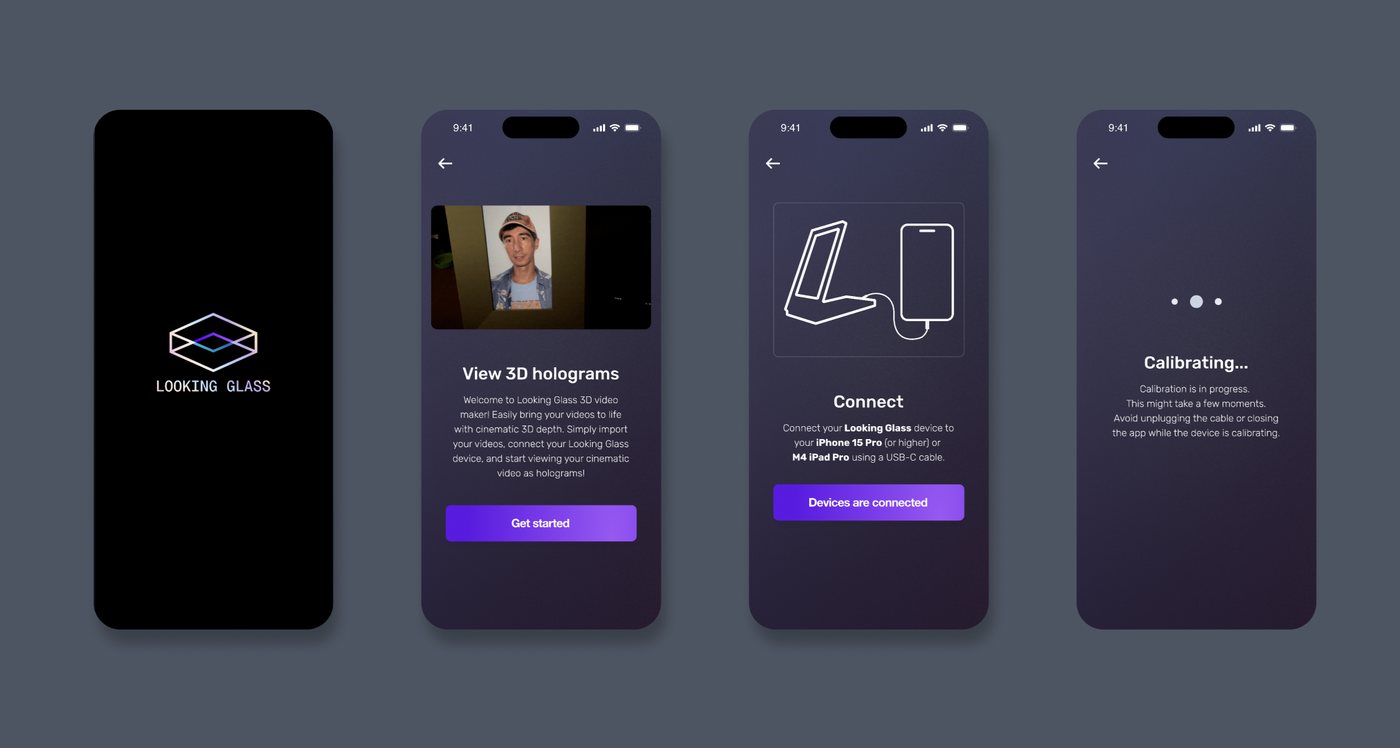
Looking Glass Studio onboarding flow: splash logo, View 3D holograms intro, Connect screen for pairing a Looking Glass display, and a calibrating screen
Splash through first pairing: the four screens a new user sees before their first hologram plays.

One player, three unrelated formats.

Cinematic, RGB-D, and Quilt come from entirely different pipelines and arrive at Studio looking nothing alike. The app's job is to make that invisible.

SOURCE Cinematic Mode shot on iPhone 15 Pro+ RGB-D file color + depth map Quilt rendered via Unity plugin Studio one properties panel, one calibration USB-C Looking Glass Go or Spatial Display shows the hologram THREE SOURCES Cinematic Mode shot on iPhone 15 Pro+ RGB-D file color + depth map Quilt rendered via Unity plugin Studio one properties panel, one calibration USB-C Looking Glass Go or Spatial Display shows the hologram

The AI doesn't live in the app.

Studio is deliberately a dumb, fast viewer. Every depth map it plays was generated somewhere else, by one of a handful of AI tools the Looking Glass community has standardized on.
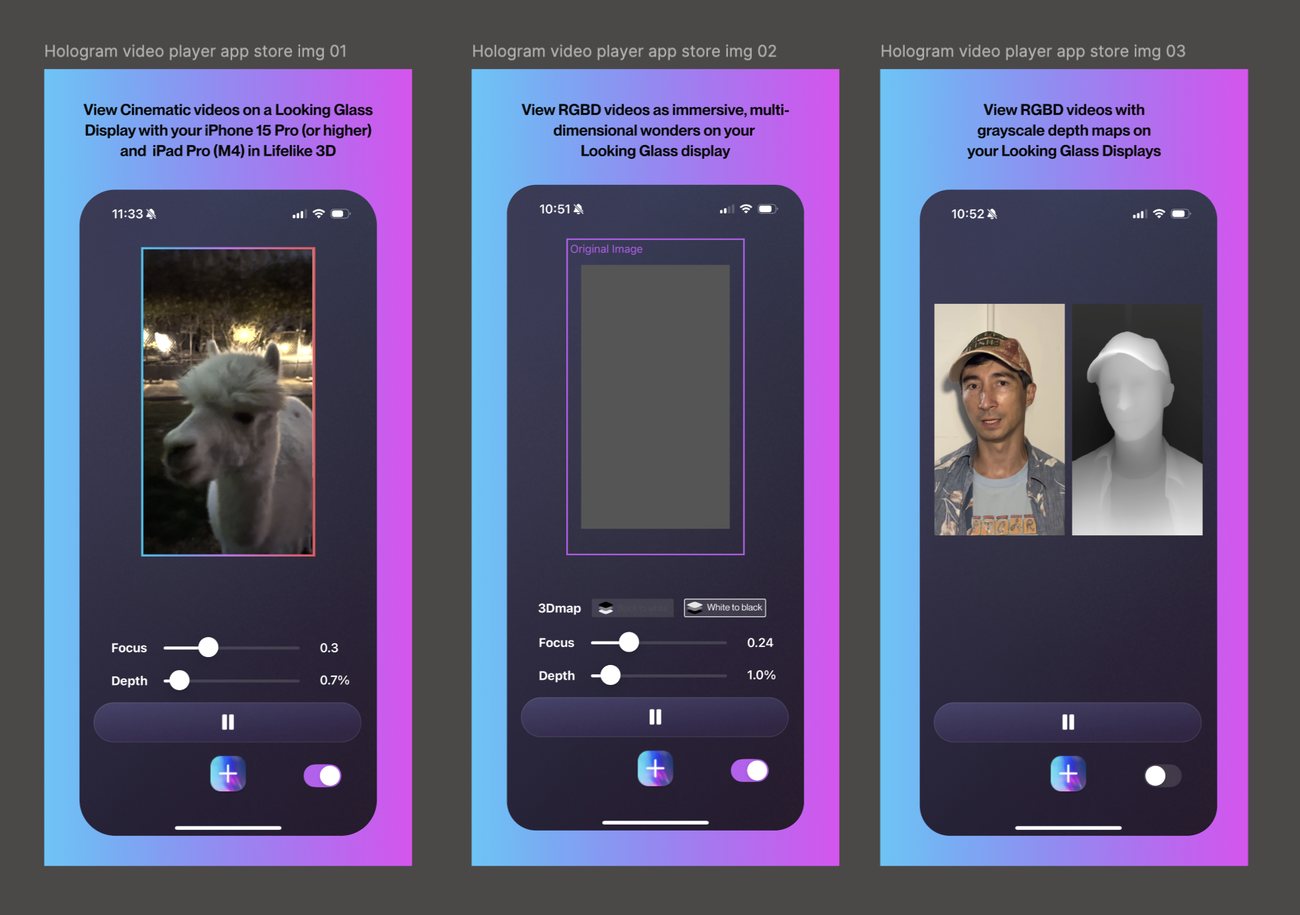
App Store marketing screenshots showing Cinematic video playback, an original image next to its AI-generated grayscale depth map, and a finished RGB-D hologram with focus and depth sliders
The three App Store screenshots we shipped with. The center one is the whole pitch: an ordinary photo goes in, a depth map comes out, and Studio plays the pair as one object.
Cinematic Mode

Apple's on-device neural depth, built into the iPhone 15 Pro camera. No separate tool required: AirDrop or the Camera app hands Studio a video with depth already attached.

on-device, no export step
Depth Anything V2

The community's baseline depth model for a single photo. Older than the alternatives below, still the fastest way to get a usable grayscale depth map out of Hugging Face.

image, web or local
Distill Any Depth

The newer recommendation for images with complex scenes: layered foregrounds, fine edges, cluttered backgrounds where Depth Anything tends to smear.

image, web or local
DepthCrafter

Depth estimation for video rather than a single frame, keeping the depth map temporally consistent from one frame to the next instead of flickering.

video
Owl3D

A packaged desktop app wrapping the same class of model behind a drag-and-drop window: pick "RGB-Depth (Looking Glass)" as the export format and skip the Hugging Face and FFmpeg steps entirely.

app, video or image

Designing for a format problem, not a feature problem.

Every real UI decision here traced back to hiding how different these three formats are under the hood.

One properties panel, five controls that don't all apply
Depthiness, Focus, Depth Position, Chroma Depth, and Depth Inversion only make sense for RGB-D content; Cinematic and Quilt media need just Focus and framing. The panel has to show the right subset per format without ever feeling like a different app depending on what got loaded.
Calibration has to survive a firmware mismatch
Loading a visual.json from the display's calibration folder is a one-time step, but Go units need firmware v1.0.59 or later to support it at all. Getting a user with an older Go to the right fix, an update prompt, not a support ticket, was a pairing-flow problem before it was a settings problem.
The name had to stop promising just video
The app shipped as Hologram Video. RGB-D photo support and Quilt playback made that name actively wrong for two of three formats, so the rename to Looking Glass Studio was a scope correction, not a rebrand for its own sake.
Depthinesshow pronounced the depth effect reads
Focusshifts the focal plane forward or back
Depth Positionwhich half of an RGB-D frame is depth
Chroma Depthgrayscale or color-coded depth data
Depth Inversionflips near and far when a map reads backward

What has to be true underneath.

The compatibility rules a viewer app can't hide from its users.

Minimum OSiOS 17.6 or iPadOS 17.6
Cinematic sourceiPhone 15 Pro/Pro Max or iPad Pro (M4) and later
File formatsMP4, MOV, JPG, PNG; WEBM needs re-encoding via FFmpeg first
8K videoHEVC / H.265 encoding recommended
Go compatibilityfirmware v1.0.59 or later for calibration support
iPad handoffAirDrop with "All Data" to preserve depth, Cinematic won't survive a normal share

What carried over.

Three habits from this project that show up in every hardware-adjacent app since.

01

Name the scope, not the launch feature

Hologram Video was a fine name in 2023 and actively misleading a year later. Naming for where the product is headed costs less than a rename later.

02

A viewer can stay dumb on purpose

Keeping every AI step outside the app kept Studio fast and kept its failure modes simple: a bad depth map is the source tool's problem, not a crash in the player.

03

Compatibility copy is UI copy

"Requires firmware v1.0.59+" reads like a footnote, but it's the sentence standing between a user and their next successful pairing. It gets designed, not appended.

Your questions, answered fast

Quick info about my services and process.

Have more questions? Reach out anytime.