Turning a hologram desktop app into a browser tab anyone can open.
Liteforms started as a subscription app for talking to branded holographic characters on dedicated Looking Glass hardware. It's since been rebuilt as an open-source, local-first web app that runs the same 3D avatar, voice, and language model in an ordinary browser tab, no headset, no install, no account. This case study covers the interface problems that transition raised, and how the current app answers them.
Two products, one character on screen.
The original Liteforms sold a specific magic trick: a "living hologram" you could talk to, on hardware built for exactly that. The rebuild sells almost the opposite thing: the same character, with none of the requirements. Both had to feel like the same product to design for.
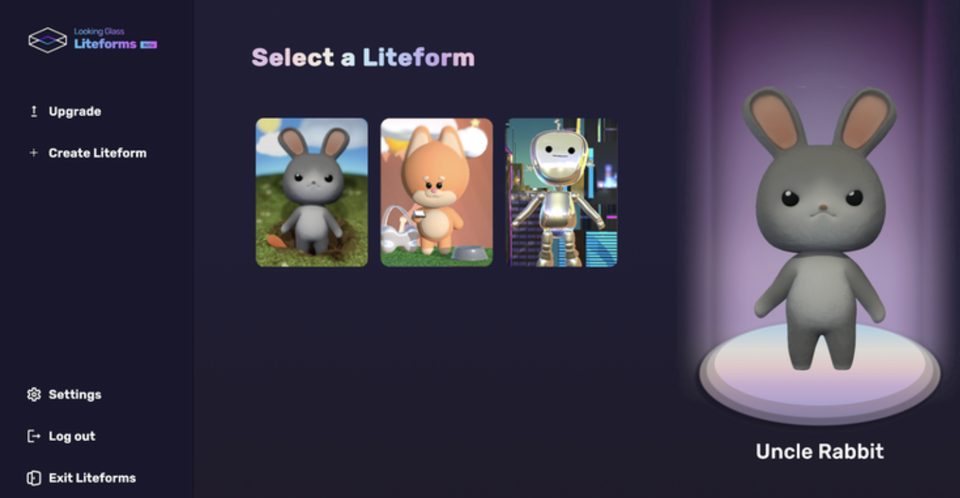
A hardware-bound app
- Windows/Mac install, GTX 1060+ recommended for Portrait displays
- Built for Looking Glass Portrait, Go, 32″ and 65″ displays
- Stable wifi mandatory, speech recognition required a live connection
- Fixed brand personas: Uncle Rabbit, Lil' Inu, Android Andi
- $20/mo subscription; custom characters at enterprise tiers
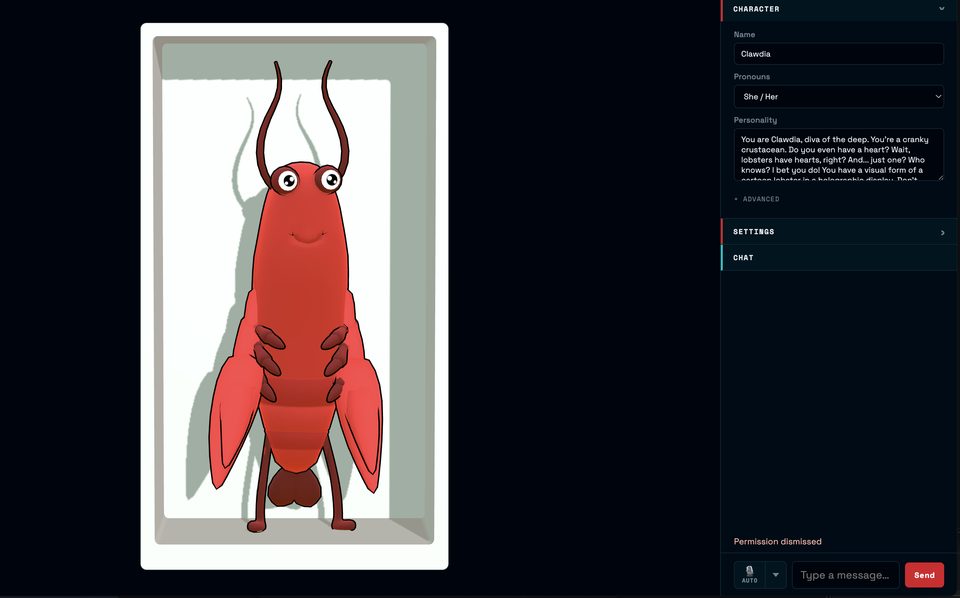
A browser-bound app
- Open source, zero install: one URL, works in any modern browser
- Looking Glass displays supported via WebXR, not required
- Runs fully offline-capable: models load and run in the browser itself
- Author any personality and name; load a VRM avatar you choose
- No account, no subscription: credentials stay in browser storage
Three tracks, two ways to run each.
A character is really three separate model choices wearing one face: what writes the reply, what speaks it, and what hears you. Liteforms Web lets every one of those run locally in the browser or through a cloud provider, which meant the settings panel had to make three independent decisions feel like one coherent one, not a wall of unrelated dropdowns.
| Track | Runs locally in-browser | Or through a cloud provider |
|---|---|---|
| Language model | on-device Gemma 4 E2B, via ONNX/Transformers |
network OpenAI, Anthropic, Google AI, and others |
| Voice output | on-device Kokoro TTS |
network ElevenLabs and others |
| Speech input | on-device Distil-Whisper |
network Deepgram and others |
Designing trust into a download.
"The AI runs in your browser" is an unusual claim, and an unverifiable one unless the interface proves it. Choosing local providers means downloading real models (hundreds of megabytes) into the tab you're sitting in. The status panel exists to make that ordinary rather than alarming.
Name the model, not just "AI"
Each row names exactly what's loading (Gemma 4 E2B q8, Kokoro, Distil-Whisper) instead of a single opaque "loading AI…" state. A named thing downloading is legible; an unnamed one reads as a stall.
Show the percentage, even at zero
"Local models: 0%" is visible before anything has moved. Starting from a real number, rather than appearing only once progress exists, is what tells a user the app is working rather than idle.
Say where the requests go
The plain line under the panel, "All requests made directly from this browser," is the whole privacy pitch of the local path, stated once, in the one place someone is deciding whether to trust it.
A character you author, not one you pick.
The desktop era sold a small roster of fixed mascots, with a custom one available if you bought an enterprise tier. The web app inverts that: authoring a personality is the default action, and a single example character shows what's possible instead of standing in as one of many official choices.
Then: three official personas
Uncle Rabbit, Lil' Inu, and Android Andi each shipped with a fixed voice, look, and script, built by the team, not the person talking to them. A brand wanting something different paid for a custom build.
Now: one form, infinite characters
Name, pronouns, and a free-text personality prompt replace the roster. The default (Clawdia, a cranky lobster) exists to be immediately overwritten, not defended as the "real" character.
One interface, two kinds of display.
The product still has to work on the hardware it was named for. But it can no longer assume that hardware is present: the same layout renders as a flat chat window on a laptop and as a lightfield view with real depth on a Looking Glass display, without knowing in advance which one it's on.
What carried over.
Three working principles from redesigning around a platform the product no longer requires.
Make the invisible legible
On-device inference has no server log a user can check. Naming the model and showing real progress is the only proof the interface can offer.
Authoring beats a roster
One good form for personality, name, and voice scales further than any fixed cast of characters ever could, and costs nothing to keep adding to.
Design for the display you don't control
Treat the plain browser tab as the real product and the lightfield as what it becomes on the right hardware, never the reverse.